- الصفحة الرئيسية /
- إلكترونيات /
- إكسسوارات الكمبيوتر /
- Computer Accessories & Peripherals /
- Cables & Accessories /
- Cables & Interconnects /
- USB Cables /
- EEEKit 2 Port USB 2.0 Manual Sharing Switch H...




منتج #:
4999500
EEEKit 2 Port USB 2.0 Manual Sharing Switch Hub, Printer Scanner Splitter Adapter with 2 Pack USB A to B Cables
88% من المشترين سيوصون بهذا المنتج لصديق
منتج #:
4999500
ILS 106
تفاصيل السعر
باستثناء رسوم الشحن والجمارك ( سيتم احتساب رسوم الشحن والجمارك عند إتمام الشراء )
*سيتم استيراد جميع العناصر من أمريكا
0 ratings
اكتب رأيك
متوفر فى المخزون
 مستورد من متجر USA
كمية:
اطلب الآن واحصل عليه حول الخميس, سبتمبر 24
معاملة آمنة
تعمل يوباي جاهدة لحماية أمنك وخصوصيتك. يضمن نظام أمان الدفع المتقدم لدينا السرية من خلال تشفير معلوماتك أثناء النقل باستخدام بروتوكولات AES (معايير التشفير المتقدمة) وSSL (طبقة المنافذ الآمنة). تفاصيل الدفع الخاصة بك آمنة بنسبة %100 لأننا لا نشارك تفاصيل الدفع الخاصة بك مع بائعين تابعين لجهات خارجية
أفضل شركائنا اللوجستيين


The EEEKit Bundle for Printer Switch allows you to share a USB device between two computers, making it a convenient and cost-effective solution for home or office use.

شحن
سريع

استرجاع
مجاني*

تغليف آمن

منتجات أصلية %100

الامتثال لمعيار PCI DSS

حاصل على شهادة ISO 27001



Note: Step Down Voltage Transformer required for using electronics products of أمريكا store (110-120). Recommended power converters اشتري الآن.


مايفيد
Manual Switching
Allows users to effortlessly switch between two PCs for printer access, eliminating the need for complex software or setup, enhancing usability in home or office environments.
USB 2.0 Compatibility
Supports USB 2.0 for fast and reliable data transfer, ensuring efficient scanning and printing without latency issues, suitable for both personal and professional tasks.
Complete Bundle
Includes two USB A to B printer cables, providing everything needed for immediate setup and use, offering excellent value and convenience for users looking to streamline their printing workflow.
تفاصيل المنتج
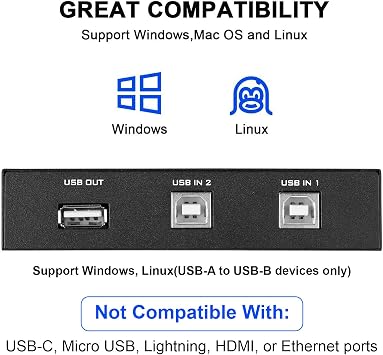
- Compatible with printers, scanners, external hard drives, projectors, cameras, hubs, and keyboards with USB-A ports.
- Cost-saving device allowing 2 computers to access USB-compatible devices, reducing equipment spending.
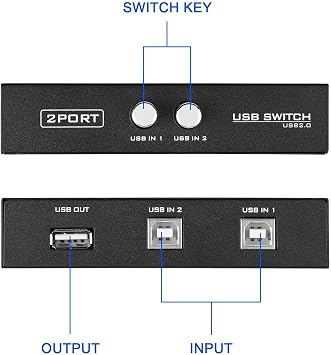
- Easy installation with plug and play, push button switch, and no external power supply required.
- Includes 2 high-speed multi-shielded USB 2.0 A-Male to B-Male cables suitable for various USB peripherals.
- Package consists of 1 x 2 Port USB 2.0 Sharing Switch Box and 2 x 5 Feet USB A to B Cables.
- Allows 2 computers to access a single USB device with USB 2.0 specification compliance and support for various operating systems.
| Hardware Interface | USB, USB 2.0 |
| Additional Features | Powered |
| Compatible Devices | PC, Printers, Projectors, Scanners |
| Total Usb Ports | 2 |
| Data Transfer Rate | 480 megabits_per_second |
| Number of Ports | 2 |
| Operating System | Windows 10, Windows 7 |
| Color | Black |
| Enclosure Material | Polycarbonate |
| Brand | EEEKit |
| Manufacturer | EEEKit |
| UPC | 700580736831 715444590054 |
| Number of Items | 1 |
| Model Number | 772116 |
| Mfr Part Number | B070020-E004934587FBA |
| Special Feature | Powered |
| Item Weight | 0.5 lbs (230 grams) |
من يجب أن يشتري؟

-
Small Office Use
Ideal for small offices with multiple computers sharing a single printer or scanner for cost-saving solutions.
-
Home Office Setup
Perfect for remote workers needing a simple way to switch between two PCs using one printer.
-
Students' Needs
Great for students using shared printers in dorm rooms or study areas to minimize equipment footprint.

-
High-Volume Printing
Not suitable for environments requiring heavy printing, as manual switching could disrupt workflow efficiency.
وصف المنتج
هل لديك أي استفسار؟ تحدث معنا
أسئلة العملاء & الإجابات
-
سؤال:
What is the main function of the EEEKit 2 Port USB 2.0 Manual Printer Scanner Sharing Switch Hub?
إجابه: The primary function of the EEEKit 2 Port USB 2.0 Manual Printer Scanner Sharing Switch Hub is to allow two different computers to share a single USB printer or scanner. This is particularly useful in home offices or small businesses, where resources need to be optimized. With a simple switch, users can toggle between the two connected PCs, ensuring both can access the same printer or scanner without the hassle of constantly plugging and unplugging cables. -
سؤال:
How do you set up the EEEKit USB switch hub?
إجابه: Setting up the EEEKit USB switch hub is straightforward. Simply connect the USB B end of the provided cables to your printer or scanner, and the USB A ends to the two computers. Then, use the manual switch on the hub to choose which PC you want to access the printer or scanner. This setup enables quick and efficient swapping, making it ideal for shared workspaces where multiple users need to print or scan documents. -
سؤال:
Is any software required to use the EEEKit sharing switch hub?
إجابه: No, the EEEKit 2 Port USB sharing switch hub operates without any software installation. It is a plug-and-play device, which means once it’s physically connected to your printer/scanner and computers, it will work immediately upon switching. This feature makes it highly convenient and user-friendly for individuals who might not be tech-savvy and want to avoid complicated setups. -
سؤال:
Can I connect more than two computers to the EEEKit hub?
إجابه: The EEEKit 2 Port USB switch hub is designed specifically for two computers to connect to one printer or scanner. While you cannot directly connect more than two computers, you can use additional USB hubs or splitters to expand your setup. However, this may complicate the operation and is not recommended for optimal performance since the hub is built for straightforward two-PC sharing. -
سؤال:
Which devices are compatible with the EEEKit switch hub?
إجابه: The EEEKit switch hub is compatible with most USB printers and scanners that utilize USB 2.0 connections. This includes a wide range of popular brands, ensuring that users can rely on the hub for their everyday printing and scanning needs. If you have a device that fits this description, it is likely to work seamlessly with the switch hub. -
سؤال:
What are the benefits of using a USB sharing switch hub?
إجابه: Using a USB sharing switch hub like the EEEKit offers various benefits, such as saving space and reducing clutter by eliminating the need for multiple printers or scanners. It streamlines operations in shared environments, making it easier for multiple users to access a single device without interruptions or downtime. It also contributes to cost efficiency by allowing users to share resources effectively. -
سؤال:
What is included in the EEEKit switch hub package?
إجابه: The EEEKit switch hub package typically includes the USB sharing switch hub itself and two USB A to B cables. These cables enable immediate connection to your printer or scanner and your computers, ensuring you have everything you need to get started with sharing functionality right out of the box. Keep in mind to verify if any additional accessories are required for your specific setup. -
سؤال:
Is there a power supply needed for the EEEKit switch hub?
إجابه: No separate power supply is needed for the EEEKit 2 Port USB switch hub. It operates solely on the power supplied through the USB connections to the computers and the printer/scanner. This makes it highly portable and convenient for on-the-go users who require a simple solution without additional power needs, enhancing its usability in various work environments. -
سؤال:
What should I do if the switch hub is not working?
إجابه: If the EEEKit switch hub is not functioning correctly, first check all physical connections to ensure they are secure. Disconnect and reconnect the USB cables, and verify that the printer or scanner is powered and functional. Additionally, confirm that you've selected the correct PC using the manual switch. If the issue persists, testing with different USB ports or devices can help isolate the problem. -
سؤال:
Where can I buy the EEEKit 2 Port USB 2.0 Manual Printer Scanner Sharing Switch Hub?
إجابه: You can purchase the EEEKit 2 Port USB 2.0 Manual Printer Scanner Sharing Switch Hub on Ubuy, which offers a wide range of electronic products. Ubuy provides a convenient platform for users in Palestine to find and order this device, ensuring you receive it directly at your doorstep with a secure shopping experience.
EEEKit USB Cables 772116 Editorial Review


The USB 2.0 Printer Sharing Switch is an easy-to-use device that allows you to switch one printer between two computers. The unit measures approximately 4.5 inches long by 3 inches wide (including buttons) by 1 inch high. This product is commonly used to share printers between computers but it can also switch between mice and other devices. The customer experience and reception of the product are varied. Positive feedback regards the ease of use, high quality, fast shipping, and compatibility with different operating systems. Negative feedback concerns the cheapness of the Chinese-made hardware, poor quality of connectors and cables that disconnect at the slightest touch or do not seat reliably, and manufacturing defects that cause the device to work inconsistently or to stop working after the 30-day return window.
مراجعات العملاء وتقييماتهم
1230 تقييمات العملاء
-
5 نجمة
76%
-
4 نجمة
11%
-
3 نجمة
5%
-
2 نجمة
2%
-
1 نجمة
6%
أضف تقييم لهذا المنتج
شارك أفكارك مع عملاء آخرين
إيجابيات
- Easy-to-use device
- Can switch one printer between two computers
- Can switch between other devices
- Compatible with different operating systems
- Fast shipping
سلبيات
- Poor quality of connectors and cables
منصة موثوقة وثقة كاملة للمشتري

JK
Jasmin
مشتري موثّق
“Great products and very good service: very easy and very fast international delivery.”
9 September 2026 · عبر Trustpilot
AG
Anke
مشتري موثّق
“Wonderful online shopping experience, smooth transaction from the start. Payment method works conveniently and delivery is unexpectedly fast and reliable. You go the extra mile for service. What makes this even more amazing, you deliver to Namibia. I will remain a happy Ubuy customer and will increase my purchases for sure! Thank you!”
10 September 2026 · عبر Trustpilot
H
Hazel
مشتري موثّق
“Very easy to find the products what you need, and so fast delivery, that’s why I highly recommended to others costumers to used ubuy.”
10 September 2026 · عبر Trustpilot
O
Opaleye
مشتري موثّق
“I received exactly what I ordered I was skeptical about your site because that was my first time to order. But the order came timely and neatly packaged. I was not disappointed. Thank you.”
11 September 2026 · عبر Trustpilot
AC
Adele
مشتري موثّق
“Easy to find and order what you want on the website. Delivery is quick to the UK”
8 September 2026 · عبر Trustpilot
الخروج الآمن
شحن عالمي
إسترجاع سهل
منتجات أصلية
تاريخ سعر المنتج
معلومات مهمة
- القيود: بالنسبة للمنتجات التي يتم شحنها دولياً، يُرجى ملاحظة أن أي ضمان من الشركة المصنعة قد لا يكون صالحاً؛ قد لا تتوفر خيارات خدمة الشركة المصنعة؛ قد لا تكون أدلة المنتج والتعليمات وتحذيرات السلامة مكتوبة بلغة بلد المقصد؛ قد لا يتم تصميم المنتجات (والمواد المصاحبة لها) وفقاً لمعايير بلد الوجهة والمواصفات ومتطلبات الملصقات؛ وقد لا تتوافق المنتجات مع الجهد الكهربي المستخدم في بلد الوجهة والمعايير الكهربائية الأخرى (تتطلب استخدام محوّل كهربي أو جهاز تحويل إذا كان ذلك مناسباً). المستلم مسؤول عن ضمان إمكانية استيراد المنتج بشكل قانوني إلى بلد الوجهة. عند الطلب من يوباي أو الشركات التابعة لها، يكون المستلم هو المستورد المسجل ويجب أن يلتزم بجميع القوانين واللوائح الخاصة ببلد الوجهة.
- ليست كل المنتجات المدرجة على يوباي معروضة للبيع، لأن يوباي هو محرك بحث عالمي. المنتجات تخضع للوائح التصدير / التجارة.
ILS 106
اطلب الآن واحصل عليه حول الخميس, سبتمبر 24
هذا المنتج غير ممنوع في بلدي. (الرجاء الضغط على الرابط أعلاه إذا لم يكن هذا المنتج ممنوعاً في بلدك ، لذلك سيقوم فريقنا بمراجعته والسماح به.)
كمية:
معاملة آمنة
نوفر لك مدفوعات مشفّرة، وحماية متكاملة للمشتري، مع الالتزام بمعايير PCI DSS وشهادة ISO 27001:2022 لضمان أعلى مستويات الأمان في كل عملية شراء.
أفضل شركائنا اللوجستيين
أسرع توصيل عبر الحدود
المميزات والفوائد
- Share a USB device between two computers
- Compatible with USB 2.0/1.1/1.0
- No external power required
- Includes 2 USB A to B cables
- Easy to use with individual buttons
- Ideal for home or office use
ضمان Ubuy
تسوّق بثقة مع منتجات أصلية %100، ومدفوعات آمنة متوافقة مع معيار PCI DSS، وحماية بيانات معتمدة وفق ISO 27001، وشحن دولي سريع، وإرجاع مجاني*، وتغليف آمن لكل طلب.