- الصفحة الرئيسية /
- إلكترونيات /
- Television & Video /
- إكسسوارات التلفزيونات /
- أجهزة التحكم عن بعد /
- Repair Membrane for Logitech Harmony Remote 6...
0 ratings


منتج #:
40543004
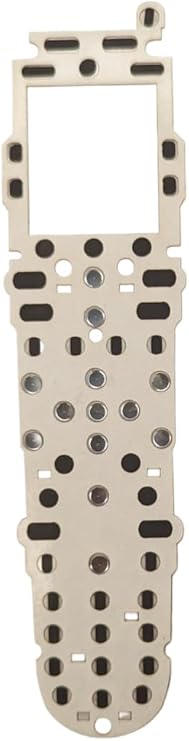
Repair Membrane for Logitech Harmony Remote 600 650 665 700
87% من المشترين سيوصون بهذا المنتج لصديق
منتج #:
40543004
ILS 148
تفاصيل السعر
باستثناء رسوم الشحن والجمارك ( سيتم احتساب رسوم الشحن والجمارك عند إتمام الشراء )
*سيتم استيراد جميع العناصر من أمريكا
0 ratings
اكتب رأيك
متوفر فى المخزون
 مستورد من متجر USA
كمية:
اطلب الآن واحصل عليه حول الجمعة, أكتوبر 02
معاملة آمنة
تعمل يوباي جاهدة لحماية أمنك وخصوصيتك. يضمن نظام أمان الدفع المتقدم لدينا السرية من خلال تشفير معلوماتك أثناء النقل باستخدام بروتوكولات AES (معايير التشفير المتقدمة) وSSL (طبقة المنافذ الآمنة). تفاصيل الدفع الخاصة بك آمنة بنسبة %100 لأننا لا نشارك تفاصيل الدفع الخاصة بك مع بائعين تابعين لجهات خارجية
أفضل شركائنا اللوجستيين


ButtonWorx is the only button repair that can last, Tested over 1 million button presses!

شحن
سريع

استرجاع
مجاني*

تغليف آمن

منتجات أصلية %100

الامتثال لمعيار PCI DSS

حاصل على شهادة ISO 27001



Note: Step Down Voltage Transformer required for using electronics products of أمريكا store (110-120). Recommended power converters اشتري الآن.


مايفيد
Precision Fit
Designed specifically for Logitech Harmony Remote models 600, 650, 665, and 700, ensuring a perfect fit that restores functionality and enhances user experience while prolonging the remote's lifespan.
Easy Installation
User-friendly installation process allows for quick replacement without the need for professional assistance, making it accessible for anyone to restore their remote quickly and efficiently.
Durable Quality
High-quality materials ensure long-lasting durability, resisting wear and tear while providing a reliable solution that protects devices and enhances usability for everyday remote control functions.
تفاصيل المنتج
- ButtonWorx membrane repair kit is designed for Logitech Harmony Remote Models 600, 650, 665, and 700, and it is installed onto the circuit board under the original keypad.
- The repair kit facilitates the completion of the switch by pressing down on the ButtonWorx pad when the old rubber buttons engage, effectively taking over the electrical function of the original rubber buttons.
- Tested over 1 million button presses, the repair kit is specifically designed to address the wear and tear issues of rubber contact buttons, particularly for directional, channel, and volume functions.
- Featuring a 2mm thick acrylic light pipe plastic, the repair kit requires careful placement to ensure it covers the power button on the top left and properly touches the circuit board. Additionally, the light pipe plastic needs to be positioned on top of the repair, completing the layers as follows: 1. Green circuit board, 2. Paper-thin white sticker holding the metal snap domes in place, 3. ButtonWorx membrane repair pad, 4. Thick plastic light pipe with white reflector, and 5. Original rubber keypad.
- Updated in 2023, the repair kit now offers an easy Put-In-Place installation, although it does require disassembly of the remote for installation
- The ButtonWorx repair membrane is the only solution that can effectively address the wear issues with rubber keypads, providing a long-lasting fix. It is a reliable alternative to traditional peel-and-stick pieces.
| Package Weight | 1 Pound |
من يجب أن يشتري؟

-
DIY Enthusiasts
Individuals who enjoy repairing their devices will appreciate the ease of use and cost-effectiveness of this product.
-
Harmony Remote Users
Users of models 600, 650, 665, and 700 will find this replacement membrane perfect for restoring functionality.
-
Budget-Conscious Consumers
People looking to save money on replacing their remotes will benefit from this affordable repair option.

-
Non-Technical Users
Individuals with limited technical skills may struggle to install the repair membrane successfully on their remote.
وصف المنتج
Repair Membrane for Logitech Harmony Remote 600 650 665 700
About This Item
Introducing the ButtonWorx Repair Membrane for Logitech Harmony Remote Models 600, 650, 665, and 700! Are you tired of dealing with worn-out buttons on your Logitech Harmony remote? Look no further, because we have the perfect solution for you. The ButtonWorx Repair Membrane is designed specifically for Logitech Harmony remotes, providing a quick and easy fix for unresponsive or worn-out buttons. Compatible with a wide range of Logitech Harmony remote models, including the popular Logitech Harmony 650, 665, and 700, this replacement membrane ensures that your remote stays in perfect working condition. With its easy installation process, you don't need any professional help to fix your remote.
Simply remove the old membrane and replace it with the ButtonWorx Repair Membrane. It's as easy as that! Not only will this replacement membrane restore the functionality of your Logitech Harmony remote, but it will also enhance its durability. Made with high-quality materials, the ButtonWorx Repair Membrane is built to last, ensuring that you can continue enjoying seamless control over your devices for years to come. Investing in the ButtonWorx Repair Membrane means saving yourself the hassle and expense of purchasing a brand new remote.
You'll be amazed at how a simple replacement can bring new life to your Logitech Harmony remote. Don't let worn-out buttons ruin your remote control experience. Upgrade your Logitech Harmony remote with the ButtonWorx Repair Membrane today and say goodbye to unresponsive buttons. Order now and regain full control over your devices!.
هل لديك أي استفسار؟ تحدث معنا
أسئلة العملاء & الإجابات
-
سؤال:
What is a repair membrane for Logitech Harmony remotes?
إجابه: A repair membrane is a thin, flexible layer designed to restore the functionality of the buttons on Logitech Harmony Remote models 600, 650, 665, and 700. This membrane acts as a bridge between the control panel and circuit board, ensuring that each button press is registered accurately. Over time, the original membrane can wear out due to extensive use, leading to unresponsive buttons. Replacing the membrane can revitalize your remote, making it fully operational again, which is essential for a seamless home entertainment experience. -
سؤال:
How do I know if my Logitech Harmony remote needs a new repair membrane?
إجابه: Signs that your Harmony remote might need a new repair membrane include buttons that do not respond when pressed, inconsistent functionality, or buttons that require multiple presses to register. If you've checked that the batteries are functioning properly and the issue persists, it is likely due to a deteriorated membrane. In such cases, replacing the membrane can restore the original functionality, allowing you to easily control your devices without frustration. -
سؤال:
Can I install the repair membrane myself?
إجابه: Yes, installing a repair membrane for your Logitech Harmony remote is a DIY-friendly task. The process generally involves disassembling the remote, carefully removing the old membrane, and placing the new one in its position. Many users find step-by-step instructional videos online to guide them through the process. With a little patience and careful handling, you can successfully replace the membrane, saving costs on professional repairs and extending the lifespan of your remote. -
سؤال:
What tools do I need to replace the repair membrane?
إجابه: To replace the repair membrane of your Logitech Harmony remote, you'll typically need a few basic tools: a small Phillips screwdriver to open the remote casing, a pair of tweezers to handle the components delicately, and possibly a plastic spudger to help pry the casing open without damage. Having a clean, well-lit workspace will also make the task easier, ensuring you can manage small parts effectively during the repair process. -
سؤال:
Will replacing the repair membrane affect the functionality of my remote?
إجابه: No, replacing the repair membrane should enhance the functionality of your remote. If installed correctly, the new membrane will allow your buttons to respond as they did when the remote was new. This restoration is vital, especially for models like the Logitech Harmony 600, 650, 665, and 700, where repeated use may degrade button sensitivity. Therefore, a successful installation can significantly improve your user experience and overall satisfaction with your remote. -
سؤال:
Where can I buy a repair membrane for Logitech Harmony Remote models 600, 650, 665, 700?
إجابه: You can buy a repair membrane for Logitech Harmony Remote models 600, 650, 665, and 700 from Ubuy. Ubuy provides a convenient online shopping platform where you can easily find spare parts for your electronics, including high-quality repair membranes tailored for your specific remote model. This ensures you receive components that meet the necessary specifications for a seamless installation and restoration of your remote's functions. -
سؤال:
How much does a repair membrane cost on average?
إجابه: While I cannot provide specific price ranges, repair membranes for Logitech Harmony remotes are generally budget-friendly. The cost typically varies based on factors like store pricing policies and availability. However, investing in a new membrane is often significantly less expensive than purchasing a brand-new remote. This cost-effectiveness makes it an appealing option for maintaining your home entertainment system without breaking the bank. -
سؤال:
Are there any compatibility issues with the repair membrane?
إجابه: When purchasing a repair membrane, ensure that it is specified for Logitech Harmony Remote models 600, 650, 665, and 700. Compatibility should not be an issue if the membrane is designed for your exact model, given that these remotes share similar internal layouts. However, avoid using membranes from unrelated models, as they may not provide the correct fit or functionality, leading to further issues. -
سؤال:
How long does it take to replace the repair membrane?
إجابه: Replacing the repair membrane on your Logitech Harmony remote can typically be completed in 30 minutes to an hour, depending on your experience level with such repairs. Factors like familiarity with electronics repair and the tools at hand can speed up the process. However, take your time to ensure each step is done carefully, as rushing can lead to mistakes that may damage the remote or the new membrane. -
سؤال:
Can a repair membrane fix all button issues on my remote?
إجابه: While a repair membrane can resolve most button-related issues caused by wear and tear, it may not fix problems stemming from other components, such as the circuit board or battery connections. If the buttons still do not work after a membrane replacement, it may be worth investigating further into the internal components. Proper diagnosis can help you identify whether a membrane replacement alone will suffice or if further repairs are necessary.
buttonworx Remote Controls Editorial Review
The Logitech Harmony Button Repair kit is a great solution for those experiencing issues with their Logitech remote control buttons. This kit is easy to install and does not require any particular skills, making it suitable for anyone who can follow simple instructions. The buttons are now more responsive and firmer after the upgrade. This repair kit fixes conductive sheet issues that restore buttons to work like new. Watching the video on YouTube is highly recommended to install the kit correctly. One may need to be patient when placing the buttons since they are tiny, but the effort is worth it. The repair will outlast the remote. However, some customers mention that the hardest part of the repair is opening and reassembling the remote. Thus, it is important to follow the instructions provided in the video.
مراجعات العملاء وتقييماتهم
1 تقييمات العملاء
-
5 نجمة
100%
-
4 نجمة
0%
-
3 نجمة
0%
-
2 نجمة
0%
-
1 نجمة
0%
أضف تقييم لهذا المنتج
شارك أفكارك مع عملاء آخرين
إيجابيات
- Easy installation
- Makes buttons more responsive
- Saves money and avoids purchasing a new remote
- Highly recommended to watch YouTube video
سلبيات
- Some customers experienced difficulty opening and reassembling remote
منصة موثوقة وثقة كاملة للمشتري

JK
Jasmin
مشتري موثّق
“Great products and very good service: very easy and very fast international delivery.”
9 September 2026 · عبر Trustpilot
AG
Anke
مشتري موثّق
“Wonderful online shopping experience, smooth transaction from the start. Payment method works conveniently and delivery is unexpectedly fast and reliable. You go the extra mile for service. What makes this even more amazing, you deliver to Namibia. I will remain a happy Ubuy customer and will increase my purchases for sure! Thank you!”
10 September 2026 · عبر Trustpilot
H
Hazel
مشتري موثّق
“Very easy to find the products what you need, and so fast delivery, that’s why I highly recommended to others costumers to used ubuy.”
10 September 2026 · عبر Trustpilot
O
Opaleye
مشتري موثّق
“I received exactly what I ordered I was skeptical about your site because that was my first time to order. But the order came timely and neatly packaged. I was not disappointed. Thank you.”
11 September 2026 · عبر Trustpilot
AC
Adele
مشتري موثّق
“Easy to find and order what you want on the website. Delivery is quick to the UK”
8 September 2026 · عبر Trustpilot
الخروج الآمن
شحن عالمي
إسترجاع سهل
منتجات أصلية
تاريخ سعر المنتج
معلومات مهمة
- القيود: بالنسبة للمنتجات التي يتم شحنها دولياً، يُرجى ملاحظة أن أي ضمان من الشركة المصنعة قد لا يكون صالحاً؛ قد لا تتوفر خيارات خدمة الشركة المصنعة؛ قد لا تكون أدلة المنتج والتعليمات وتحذيرات السلامة مكتوبة بلغة بلد المقصد؛ قد لا يتم تصميم المنتجات (والمواد المصاحبة لها) وفقاً لمعايير بلد الوجهة والمواصفات ومتطلبات الملصقات؛ وقد لا تتوافق المنتجات مع الجهد الكهربي المستخدم في بلد الوجهة والمعايير الكهربائية الأخرى (تتطلب استخدام محوّل كهربي أو جهاز تحويل إذا كان ذلك مناسباً). المستلم مسؤول عن ضمان إمكانية استيراد المنتج بشكل قانوني إلى بلد الوجهة. عند الطلب من يوباي أو الشركات التابعة لها، يكون المستلم هو المستورد المسجل ويجب أن يلتزم بجميع القوانين واللوائح الخاصة ببلد الوجهة.
- ليست كل المنتجات المدرجة على يوباي معروضة للبيع، لأن يوباي هو محرك بحث عالمي. المنتجات تخضع للوائح التصدير / التجارة.
ILS 148
اطلب الآن واحصل عليه حول الجمعة, أكتوبر 02
هذا المنتج غير ممنوع في بلدي. (الرجاء الضغط على الرابط أعلاه إذا لم يكن هذا المنتج ممنوعاً في بلدك ، لذلك سيقوم فريقنا بمراجعته والسماح به.)
كمية:
معاملة آمنة
نوفر لك مدفوعات مشفّرة، وحماية متكاملة للمشتري، مع الالتزام بمعايير PCI DSS وشهادة ISO 27001:2022 لضمان أعلى مستويات الأمان في كل عملية شراء.
أفضل شركائنا اللوجستيين
أسرع توصيل عبر الحدود
المميزات والفوائد
- ButtonWorx membrane repair kit lasts long
- 2023 updated with easy Put-In-Place installation
- Needs disassembling and cleaning the device for installation
- Repairs all worn out rubber contact buttons
- Directional, channel and volume keys can only be cleaned
- Comes with 2mm thick acrylic light pipe plastic for placement
ضمان Ubuy
تسوّق بثقة مع منتجات أصلية %100، ومدفوعات آمنة متوافقة مع معيار PCI DSS، وحماية بيانات معتمدة وفق ISO 27001، وشحن دولي سريع، وإرجاع مجاني*، وتغليف آمن لكل طلب.